
I’d estimate we’re ~6 months from most devs moving their code agents off of their laptops
NewInstall Context Vault with one agent skill→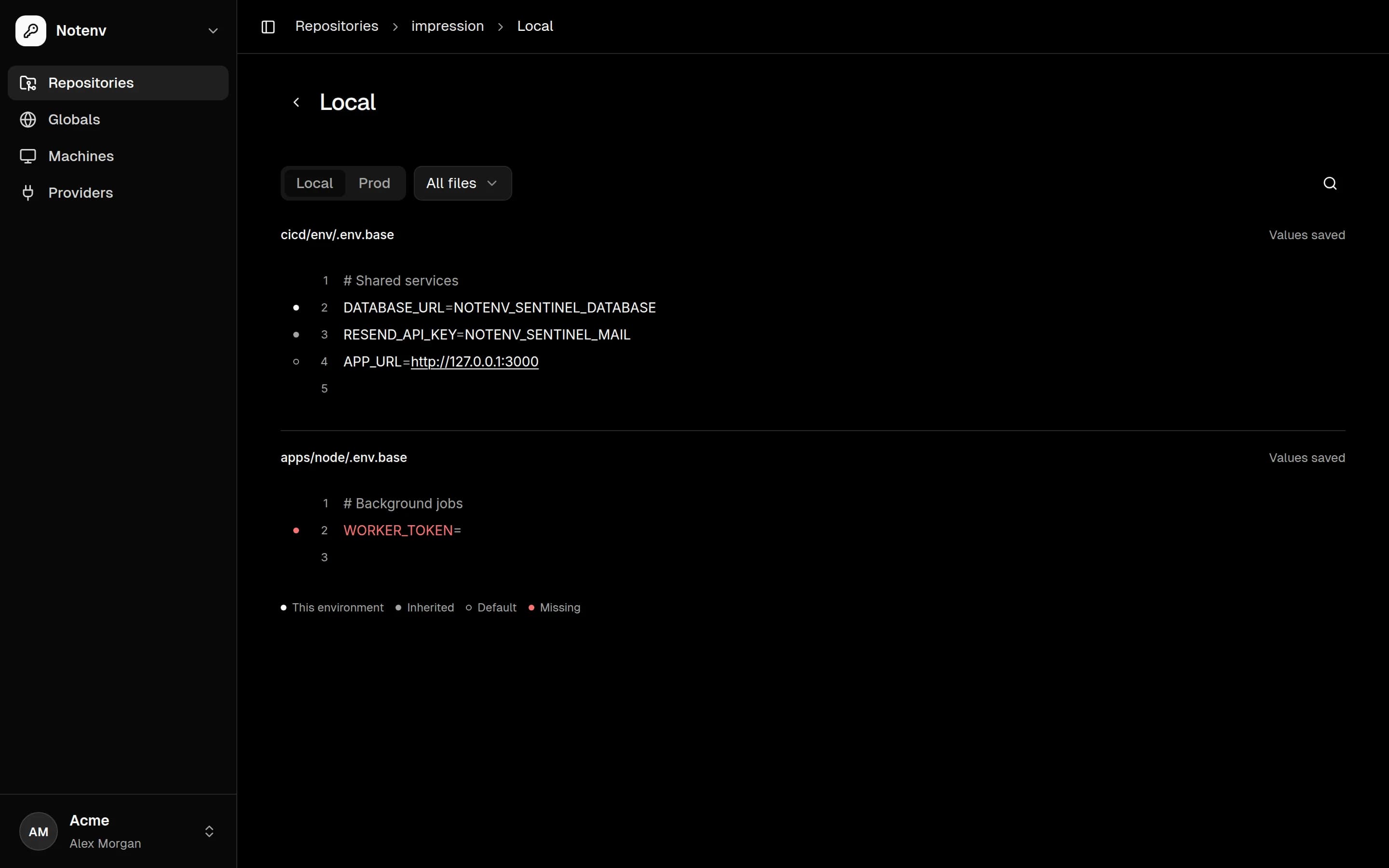
For Those Who Know the Future of Engineering is Off Your Laptop
Your third-party, global and repo-scoped skills, agent plugins and instructions, skill dependencies, secrets (SSH keys, .env's etc.) and your dirty codebases (not that kind), intelligently synced across your machines. No plaintext .env files anywhere!
If something can be done digitally, it can be done by your agents, 24/7. A task can start on a Linux machine, and move to another Mac when it needs a browser or GUI.
This is not just a reproducible environment setup for your own Linux/Mac fleet, or an Obsidian vault layout w/ custom plugins to replace Notion & Linear for you (and your team)
It's THAT and also the be-all-end-all evolving agent orchestration solution.
And it's all free and open source! 🤯
The Fleet System
Fleet
One coding fleet, many machines.
A primary Mac orchestrates, a Linux worker takes the large changes and a spare Mac does browser work. Tasks move to a Mac when they need a GUI, previews forward back to you and code stays in sync.
Explore Fleetfleet
Primary MacOrchestrates
Linux workerLarge changes
Spare MacBrowser and GUI

Notenv
Secrets without plaintext .env files.
Commit the variable names, keep the values encrypted and deliver them to the process that needs them. Agents wire it up without reading a single value.
Explore Notenvnotenv.ctx9.com
Skill Problem System
A Git-backed home for your agent skills.
Organize, configure, install and sync skills across machines. It ships with 83 published skills across 13 areas, including fleet skills that onboard machines, share dev previews and keep terminal workspaces in sync, so every machine works the way you intend.
View on GitHubskills
fleet sync
edit/skills
- fleet/fleet-i-onboard-machine
- fleet/fleet-i-public-dev-preview
- fleet/fleet-i-manage-terminal-workspaces
- fleet/fleet-i-sync-code-workspaces
- infrastructure/k3s-cluster-wizard
- uiux/code-better-ui
- creative/video-hyperframes-motion-graphics
- code/code-i-file-pr
- vault/vault-i-use-crm
- marketing/blog-i-03-write-and-refresh
- documents/docs-i-render-markdown-pdf
- finance/finance-generate-invoice
- agents/agents-i-handoff
Primary Mac~/.agents ~/.claude 83 skills
Linux worker~/.agents ~/.claude 83 skills
Spare Mac~/.agents ~/.claude 83 skills
Context Vault
Your context in one Markdown vault.
Notes, kanban, tasks, daily notes and skills, globally and per teamspace, in one local-first Obsidian vault. Relay shares the teamspace folders you choose with teammates.
Explore the VaultVault
- Daily/2026-10-28.md
- Skills/
- Teamspaces/
- Acme/
- Kanban.md
- Skills/
- Personal/
- Tasks/
Todo
Draft launch notesReview the PRDoing
Fix sign inUpdate skillsDone
Q4 planAcme/AKJMShared with Relay
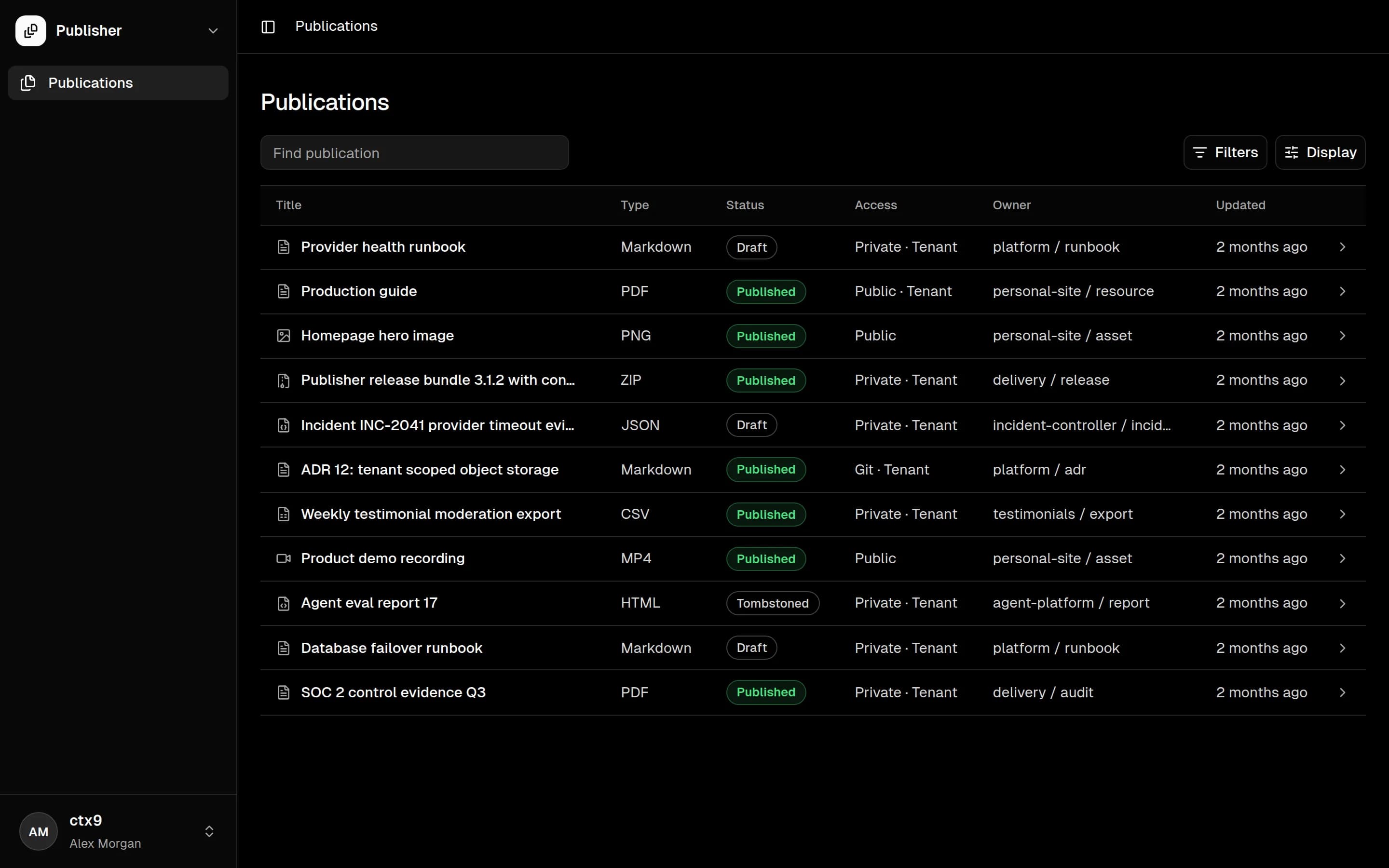
Publisher
Plans and evidence, ready for review.
Upload HTML or Markdown plans, files and videos for review or as PR evidence.
Explore Publisherfiles.ctx9.com
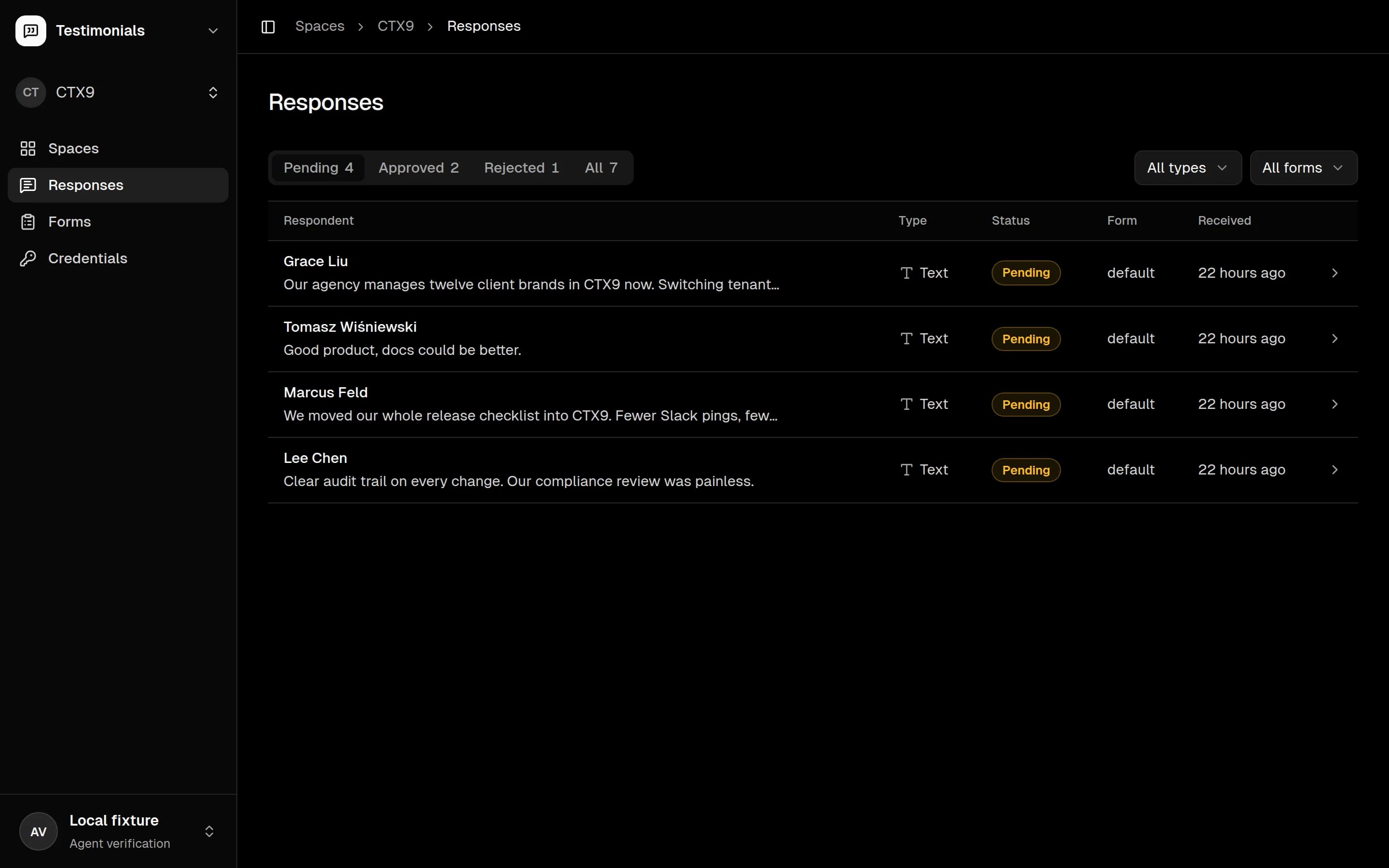
Testimonials
Testimonials on your own site.
Collect text and video testimonials, then moderate every response in one place.
Explore Testimonialstestimonials.ctx9.com
Coming soon
K3s Infrastructure
A cluster that looks after itself.
How I run my cluster with agents that triage alerts, upgrade the cluster and every service, ship hotfixes and make sure nothing is failing. Some run entirely on their own. Plus the skills that drive them.
k3s
cp-1
worker-1
worker-2
- alert: api 5xx above 5%
Fun projects

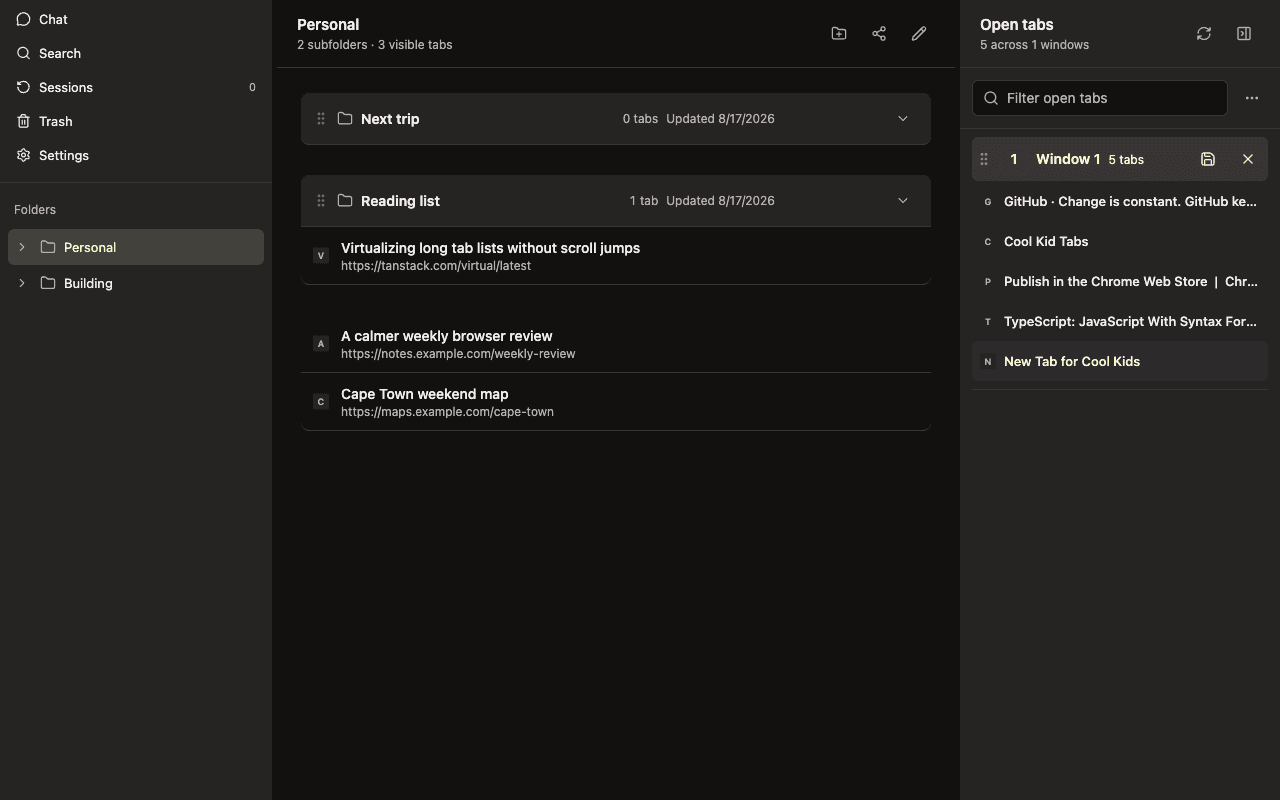
Cool Kid Tabs
Tabs, links and bookmarks in one folder tree.
A Chrome extension your agents can organize. Share a folder with anyone.
Explore Cool Kid TabsCool Kid Tabs
fleet
Primary MacOrchestrates
Linux workerLarge changes
Spare MacBrowser and GUI
Install with your agent
Install one small skill, start a fresh session, and let your agent run the setup wizard with you. It verifies the finished Vault before handing it back.
your-machine / bash
Using Claude Code? Replace --agent codex with --agent claude-code.
Just like the internet, the age of AI is the complete wild west.
That's why I'm building this. Downloading, sharing, managing, editing, and updating skills across your repositories, your Obsidian vault, and all those used to manage your fleet of local machines and laptops is a pain in the ass.
But then, you still need to manage plugins, your AGENTS.md, and other permissions and .toml setup across your machines. But they don't all have the same config! Some must have these secrets, some may not. The same skill might need to say something different on a different machine.
Git was designed for a pre-AI era. Worktrees are cumbersome. And in practice, your agents should all be working as if they were on the same machine.
Context Nine's suite of tools allows your code folder to stay in sync while you work, with conflicts duplicated and made easily greppable. Your task as an AI engineer is to know what machines your task needs to run on, and have enough of an understanding so as not to cause conflicts while working on the same branch across multiple machines. However, your machines should still be able to talk, communicate with each other, and use computer use when needed. I've found that having a spare Mac for computer use and a Linux machine for large-scale changes and a primary Mac that you orchestrate this all from is the best setup, although the more machines the merrier!
I built all of these tools and context systems because there simply wasn't a way to do all this. The way we work as engineers has fundamentally changed. And I believe the solution to that is a well-defined system based on your own file system with lots of Markdown files.
I can't believe I'm typing this, but try it for yourself, and there'll be no going back.
I'm a huge K3s fan, and so a lot of the included skills relate to how I interact with Kubernetes. I haven't published everything yet publicly, but as things get more polished, I will make them available. This repo allows me to send a voice note on my phone and have my Linux worker build and deploy an entire tested application on Kubernetes live behind Cloudflare on my existing cheap cluster hosted on Hetzner while using Computer Use on my Mac Air.
To get things done without me being there. If it can be done on a computer, it can be done with a voice note. I use VoiceInk (I know, not WhisperFlow, ooohhh) with ElevenLabs, btw. V2/V3 is just so good at capturing technical terms.
Since I'm a Kubernetes fan, my context setup involves Helm charts and deployments. It can triage Grafana alerts into governed incidents, publish PR files and readable HTML or Markdown through Publisher, run evidence-driven agents, and manage your secrets per repository with global secrets propagated into your working repositories.
I've thought a lot about all of these systems and how they work together. So that modern engineers can build at speeds never before possible. This is Context Nine.
P.S. It's also a work in progress! I want your thoughts, contributions (or just prompts) and really just to hang out would be cool. Join the Discord. Join the WhatsApp. Or let's grab a coffee if you're in Cape Town.
Frequently asked questions
Is Context Nine one app?
No. It is one system made from small open-source tools that share contracts, context, and a nine-layer model. Use only the parts you need.
Does it require Kubernetes?
No. Context Vault, Fleet, Notenv, and the public launcher run on ordinary Macs and Linux machines. Kubernetes is for managed services and always-on workloads.
Does Context Nine store my secrets?
Notenv maps requirements to the providers that already own your values. It is designed to deliver narrow capabilities without spraying plaintext into agents, repositories, or logs.
Can a team use the Vault?
Yes. The Vault stays local-first and Markdown-based. Relay can share one chosen teamspace folder with a team while the rest of the Vault remains private.
Is it finished?
No. It is a work in progress, built in the open. Thoughts, contributions, prompts, and conversations are welcome.
Build with Context Nine.
Questions, ideas, contributions, or a strange agent workflow you want to make less fragile?
Get in touch